Your Instagram account is gone. Your clients aren't
An Instagram account can be lost overnight, stolen or suspended. What disappears with it, what stays when your clients are in your own booking system, and what to do on day one.
In short
- The biggest loss isn't followers but clients whose only contact was Instagram.
- Bookings, contacts and reminders in a booking system keep working whatever happens to the account.
- The article includes day-one steps, a ready message for clients and an account security checklist.
Contents 11 parts
- 01What happens when the account disappears
- 02How accounts usually get stolen
- 03What you lose with the account
- 04Instagram is rented space
- 05What stays when clients are in your own system
- 06Collect your clients’ contacts now
- 07Day one without Instagram: what to do
- 08How to try to get the account back
- 09The first week: rebuilding the new account
- 10How to protect your account today
- 11How it looks in RINDIQ
What happens when the account disappears
Everything works in the evening. In the morning the account won't open. The password has changed, the linked email has changed, or Instagram says the account is suspended and the appeal only returns an automatic reply. It happens to beauty professionals across the industry. Some get their account back after days or weeks. Others have to start from zero with a new one.
The reasons vary. Someone guesses or steals the password. Someone sends a message that looks like a Meta notice, and the link leads to a fake login page. Sometimes an account is suspended automatically and nobody really explains why. The result is always the same: you can no longer reach your messages, your followers or your work.
If Instagram were a hobby, that would be annoying. When Instagram is where your bookings happen, it means work stops for a while. Often it also means some clients can no longer be reached at all.
How accounts usually get stolen
Hacking is rarely sophisticated. It usually starts with a message that looks ordinary and urgent. These are four ways worth knowing about:
- A fake “Meta notice”. A message or email about a copyright violation, a complaint, or your account being deleted within 24 hours. The link opens a page that looks like the Instagram login. The password you type goes to the scammers.
- An acquaintance asks for a code.Someone's account, already stolen, writes: “A code was sent to your number by mistake, can you send it to me?” It is your own account recovery code.
- A “collaboration offer”. A brand or agency offers to work with you and asks you to log in to some platform with your Instagram details.
- The same password elsewhere. If your Instagram password was also used on a site whose data once leaked, the account is open to anyone who tries it.
Beauty professionals' accounts are attractive precisely because people trust them. A stolen account can be used to offer fake promotions to followers or to ask them for money. That is why warning your clients quickly matters so much after a theft.
What you lose with the account
For most beauty professionals Instagram is three things at once: a shop window for their work, the chat where bookings happen, and a client list that isn't written down anywhere else.
- Conversations with clients. Agreed times, prices, questions, photos of the look they want. All of it stayed in chats you can no longer open.
- Upcoming appointments.If bookings lived only in messages or in your head, you no longer know exactly who is coming tomorrow. And clients don't know anything has happened.
- Contacts. For many clients you have neither a phone number nor an email. The username was the only contact.
- Portfolio. Years of photos of your work that convince new clients.
- Followers. A new account grows from zero.
A portfolio and followers can be rebuilt over time. Clients with no other contact often can't. That is the biggest loss, and it is also the easiest one to prevent in advance.
Instagram is rented space
You only partly own an Instagram account. Meta decides the rules, the algorithm and whether the account is available at all. You work there as if in a rented room: you can furnish it, but someone else holds the keys.
That isn't a reason to leave Instagram. It is where new clients find you and see your work. It is a reason to split the roles:
- Instagram is where people find you and where you show your work.
- A booking system is where your clients, their contacts and every upcoming appointment live.
- A Google Maps profile is where people searching nearby find you.
If one of these disappears, the others keep working. If everything is on Instagram, everything disappears at once.
What stays when clients are in your own system
A booking system doesn't replace Instagram. It is where the things that must not disappear with one account are kept.
- A client list with contacts. Everyone who booked has a name, a phone number and often an email. You can call or message any of them.
- Every upcoming appointment. You know who is coming this week, and work goes on.
- Reminders. Clients get a reminder before their visit whatever happens to your Instagram.
- Your booking link. The same link works in the new account, on Google Maps and on WhatsApp. Clients can book while you sort out the account.
- History and notes. Who had what, when their last visit was, who is allergic to which product.
Instagram stays where people find you. Your clients stay yours.
Collect your clients’ contacts now
The best time to prepare is while your account is fine. Here is how to move clients from Instagram chats to your own list, a little at a time:
- Offer the next visit through your link. When a client messages you, reply with the link. When they book, they enter their own phone number and email.
- Ask in person. While the client is with you, ask for their phone number. It takes half a minute, and most people are happy to give it.
- Add the clients you already know. If you have contacts in your phone or a spreadsheet, they can go into the system now, not only when each client next books.
After a few months, most of your active clients will be on your own list with their contacts. Instagram then stays the place where they look at your work, not the only thread that leads to them.
Day one without Instagram: what to do
- Ignore offers of “help”.Right after a theft, scammers usually start offering to recover the account for a fee. Real Instagram support doesn't ask for money and doesn't message you.
- Warn your clients.If someone writes from your old account from now on, it isn't you. Say so, so nobody sends money to a scammer. If you have clients' phone numbers or emails, message at least the ones coming in the next few days.
- Create a temporary account and explain what happened in its bio, with your booking link.
- Ask regular clients and friends to share the new account in their stories.
- Update your details elsewhere: your Google Maps profile, Facebook page and WhatsApp profile.
Ready-to-use message
Message after your account was stolen
Replace the parts in brackets with your own.
How to try to get the account back
Start with the official route. On instagram.com/hacked you can say what happened: the password was changed, the account was stolen or it was suspended. Instagram may ask you to confirm your identity, for example with a short video selfie.
- Check your email. If someone changed the email linked to the account, Instagram usually sends a message to the old address with a way to undo the change. Look in the spam folder too.
- Use only the official site and app.No “Meta employee” will message you or ask for your password or a verification code.
- Write down what happened and when. It helps if you have to appeal more than once.
Recovery can take days or weeks, and nothing is guaranteed. That is exactly why work must not stop in the meantime, and clients must still be able to book.
The first week: rebuilding the new account
If the old account doesn't come back, the new one has to grow. It happens faster than you think if you are deliberate:
- Three pinned posts. Who you are and what you do, your prices and booking link, and examples of your work. A new visitor understands straight away where they have landed.
- Your portfolio from your phone.Photos of your work are most likely still in your phone's gallery. Post the best ones gradually rather than all on one day.
- Clients help. Ask clients coming in these days to tag the new account in their stories. It is the best way for your old followers to find you.
- Don't buy followers. It brings no clients and can harm the new account.
And this time, switch on everything in the next section from day one.
How to protect your account today
- Turn on two-factor authenticationwith an authenticator app, not only SMS. You can do this in Meta's Accounts Center, under password and security.
- Use a long, unique passwordthat you don't use anywhere else. A password manager remembers it for you.
- Protect your email too. Whoever gets into your email can get into Instagram. Turn on two-factor authentication there as well.
- Keep your backup codes somewhere safe, away from your phone.
- Don't open links in messages about “copyright violations” or “account deletion”. It is one of the most common scams. If in doubt, open the Instagram app and check your notifications there.
- Download your data every couple of months. Instagram lets you download your information, including your posts and messages. That way you keep a copy.
Menu names change over time, but all of these settings live in Instagram's security section or in Meta's Accounts Center. And most importantly: nothing that must not be lost should live only on Instagram. Not your clients' contacts, and not your bookings.
How it looks in RINDIQ
With RINDIQ, clients book themselves through your link, and the system saves their name, phone number and email. You see every client and their visit history in one list and can add notes to each. You can also export the client list to a file, so you keep a copy on your own computer, and import existing clients from a spreadsheet (both on the Professional plan and up).
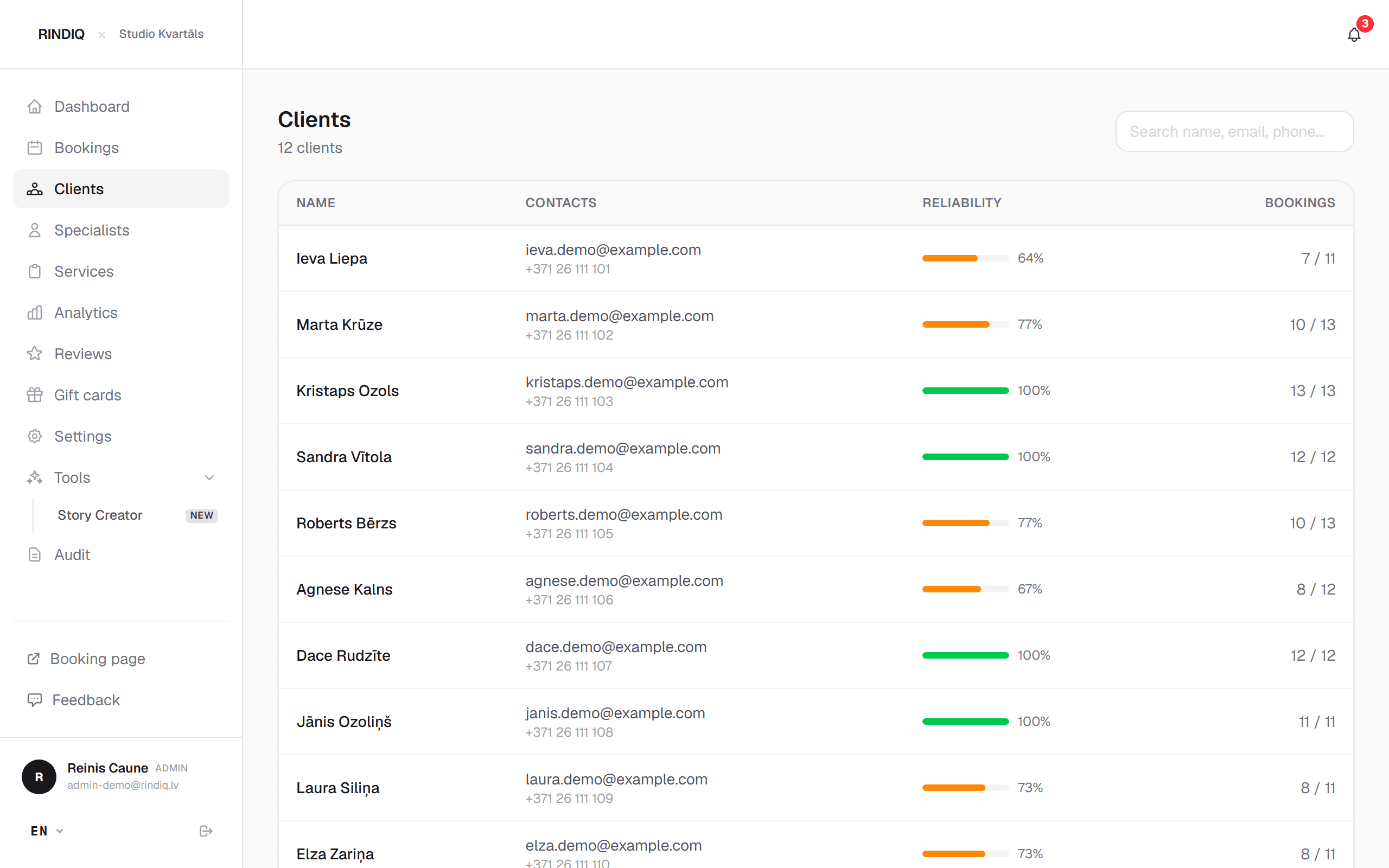
If Instagram disappears, your booking page keeps working, clients still get confirmations and reminders, and you put the same link in your new account. We wrote about moving bookings out of chats in Bookings through Instagram and WhatsApp: where clients get lost, and about putting your link everywhere people look for you in How to add your booking link to Google Maps and Instagram.
Try RINDIQ free for 14 days
No card needed. You can set up your booking page and deposits in about 5 minutes.
Read next
All articlesHow to add your booking link to Google Maps and Instagram
Step by step: your booking link on Google Maps, Instagram, Facebook and WhatsApp.
Bookings through Instagram and WhatsApp: where clients get lost
Where clients slip away in chats and how to close the gaps without stopping work.
Do I need a website if I have Instagram?
A full website, a booking page or Instagram only: what clients need to see before they book.