What online booking looks like to your client
Many professionals have never booked with themselves. The whole path step by step, as a client sees it on a phone, and where people most often stop.

In short
- Book with yourself to see what a client sees.
- The biggest obstacles are unclear names and a missing price.
- A client can book without an account.
Contents 6 parts
“My clients won’t manage”
This is the most common worry about online booking: my clients are older, they won't manage, they'll call anyway. Some really will call. But most people already book hairdressers, doctors and restaurants on their phone, and for them it's quicker than calling.
The best way to test the worry is to look at what a client actually sees. Here is the whole path step by step, with a simple test at the end you can do with one of your clients.
The path: from link to confirmation
Good online booking is a few simple steps, with one choice in each:
- Link. The client taps a link on Instagram, Google or in a message. The page opens on their phone, no app needed.
- Start. They choose a treatment, a specialist or a time, whichever matters most to them.
- Time. They see only times really free for this treatment.
- Details. Name, phone, email. No password, no account.
- Confirmation. A message on screen and an email with the time, address and a calendar file.
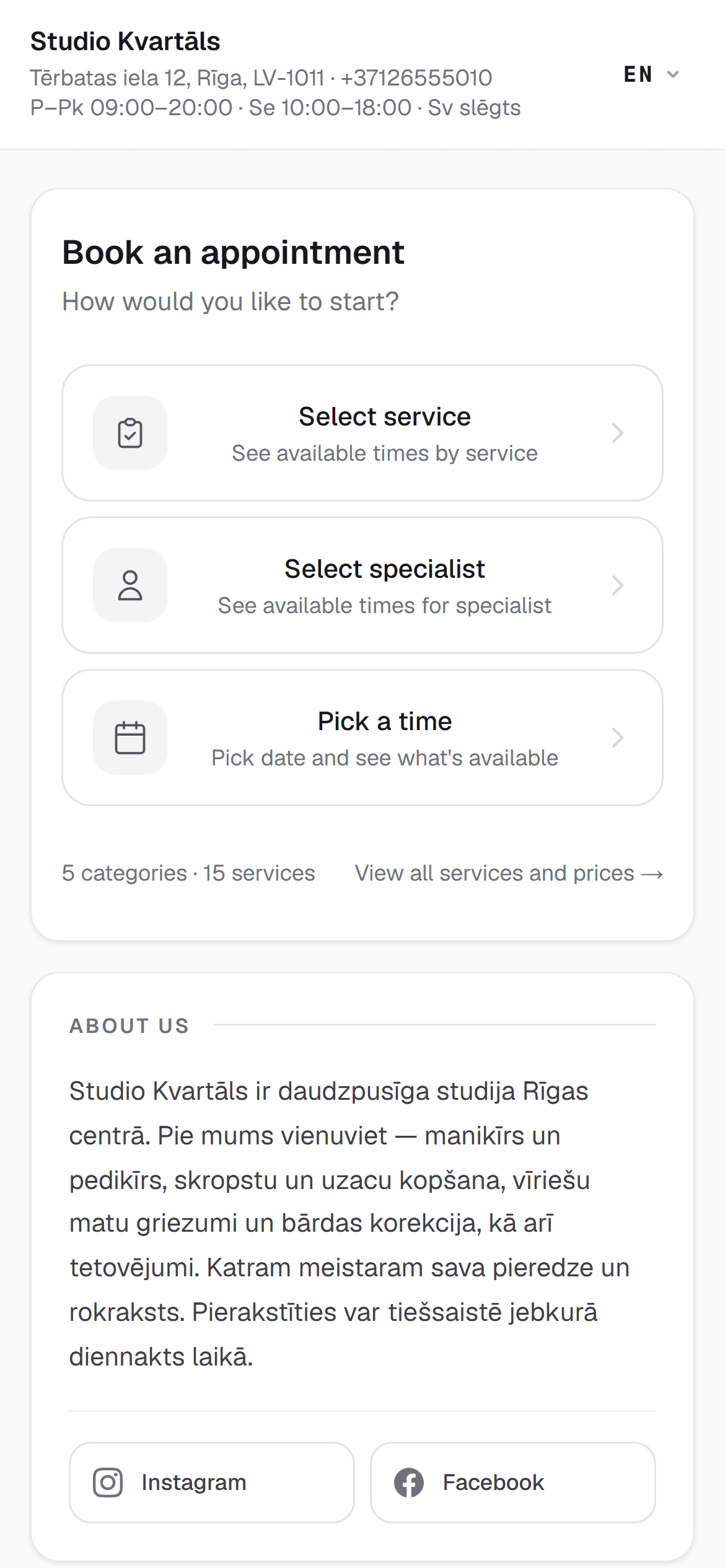
What feels different from messages
- They can choose at night. The idea to book usually comes in the evening, when you aren't answering.
- No waiting for a reply. The booking is confirmed at once, not “I'll get back to you”.
- They see the price before choosing. No awkward asking.
- Cancelling isn't awkward. It takes a link, not a conversation.
Where clients give up
Clients give up in only a few places, and those are in your control:
- A long list of services with no categories.
- Unclear names. “Nails Lux” doesn't say what they'll get. “Gel manicure, 90 min” does.
- No free times in the coming week, and nothing to say when there will be.
- A foreign language at any step.
A simple test
Ask one client to try it, and don't help. Watch where they stop. That tells you more than any check.
Ready-to-use message
Ask them to try
Replace the parts in brackets with your own.
For those who really do keep calling, nothing changes: enter them yourself in the same calendar. More on older clients is in A booking system in your clients’ language: why it matters for older clients.
How it works in RINDIQ
A client can start from a service, a specialist or a time. The page is in Latvian and English, the steps are big, and no account or password is needed. Online booking does need an email, because that is where the confirmation goes, with a calendar file and the personal link for rescheduling and cancelling.
For putting your link everywhere clients look for you, see How to add your booking link to Google Maps and Instagram.
Try RINDIQ free for 14 days
No card needed. You can set up your booking page and deposits in about 5 minutes.
Read next
All articlesBookings through Instagram and WhatsApp: where clients get lost
Where clients slip away in chats and how to close the gaps without stopping work.
How to add your booking link to Google Maps and Instagram
Step by step: your booking link on Google Maps, Instagram, Facebook and WhatsApp.
A booking system in your clients’ language: why it matters for older clients
Language, big buttons and reminders without email: booking that older clients can manage.