Reliability score: deposits only for those who don’t show up
Most clients don’t need a deposit. A tutorial on setting up the reliability score, so you only ask for prepayment from those who have already let you down.

In short
- The score comes from a client’s previous visits.
- You choose the threshold below which the system asks for prepayment.
- Loyal clients book with no extra step.
Contents 7 parts
What you’ll get
Clients who show up book without obstacles. Clients who don't, pay upfront or wait for your approval from then on. You don't have to remember who it was or write awkward messages: the system does it on its own.
It's available on Professional and Business. Why a deposit works at all is in A client didn't show up. What it costs you and how a deposit prevents it.
How the score is counted
The score is simple: completed visits divided by all visits. If 8 of 10 visits happened, it's 80%.
- Lowers it: no-shows and cancelling after your deadline.
- Doesn't lower it: cancelling in time, or visits you cancelled. Late arrivals don't affect the score either.
For the score to be right, mark each visit afterwards: completed, no-show or cancelled late. You see a client's score on their page and on the booking.
1. Switch on scoring
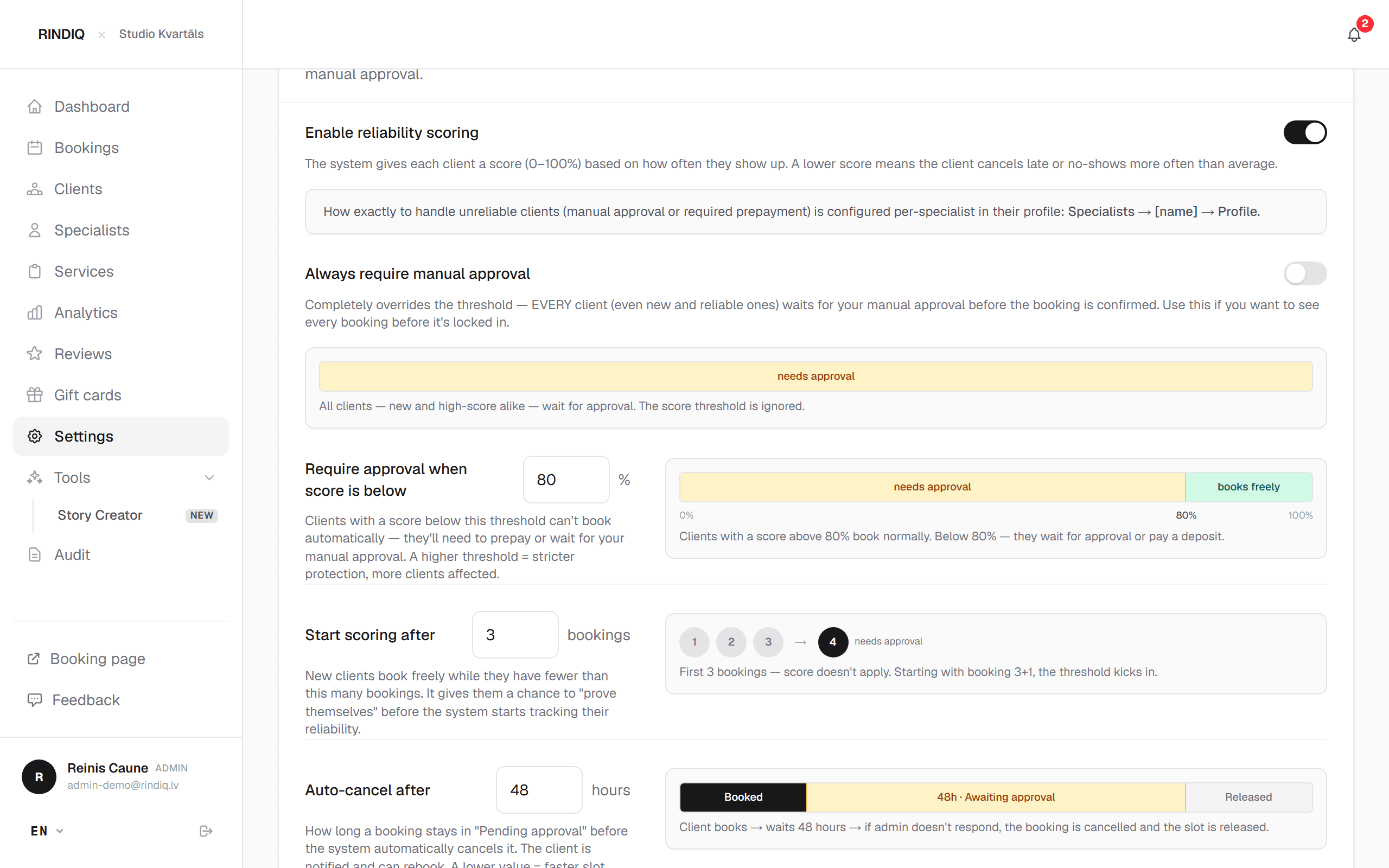
Open Settings → Business → Reliability scoring and switch on Enable reliability scoring.
2. Choose a threshold
Require approval when score is below decides when a client no longer books automatically. The default is 80%. If you are starting out, 70% is gentler and only affects those who really do miss a lot.
3. Give new clients a chance
Start scoring after (3 bookings by default) decides how many visits go by before the score applies. Without it, one sick day would put a new client at 0%. New clients are covered by the deposit instead.
4. Choose what happens with an unreliable client
This is set per specialist: Specialists → [name] → Profile → Unreliable clients.
- Manual approval.The booking waits for your decision. If you don't answer in the set time (48 hours by default), it's cancelled automatically and the slot frees up.
- Prepayment. The client pays before booking. This needs Stripe connected and online payments switched on for that specialist.
5. What the client sees
A client with a low score sees at the end of booking that prepayment or approval is needed. Everyone else sees nothing. How to talk about it if someone asks is in How to ask for a deposit without upsetting clients.
There is also Always require manual approvalfor all clients. That's the strictest setup and usually isn't needed, because it slows booking for people who are reliable.
Try RINDIQ free for 14 days
No card needed. You can set up your booking page and deposits in about 5 minutes.
Read next
All articlesClient blacklists: can you warn colleagues?
Why a shared blacklist is risky, and how to protect yourself in other ways.
A client didn't show up. What it costs you and how a deposit prevents it
One no-show on a three-hour appointment can cost around €150 and half a day. How a small deposit changes that.
How to ask for a deposit without upsetting clients
When to bring up a deposit, how to word it and what to reply when a client pushes back.