Deposits for new clients: connecting Stripe step by step
From creating a Stripe account to your first deposit in the bank. What to prepare, which settings to choose and how to check that payment works.

In short
- Have your personal details and bank account ready.
- The deposit goes to your account, and the client sees it before paying.
- Go through the whole path yourself before you start.
Contents 7 parts
What you’ll get
New clients pay a deposit for their first visit, and you never have to ask for it in a message.Regulars aren't affected, the money goes to your account, and if a client doesn't show, you already have part of the revenue.
Deposits for new clients are available on Professional and Business, including during the trial. Why they pay off is worked out in A client didn't show up. What it costs you and how a deposit prevents it.
1. Connect Stripe
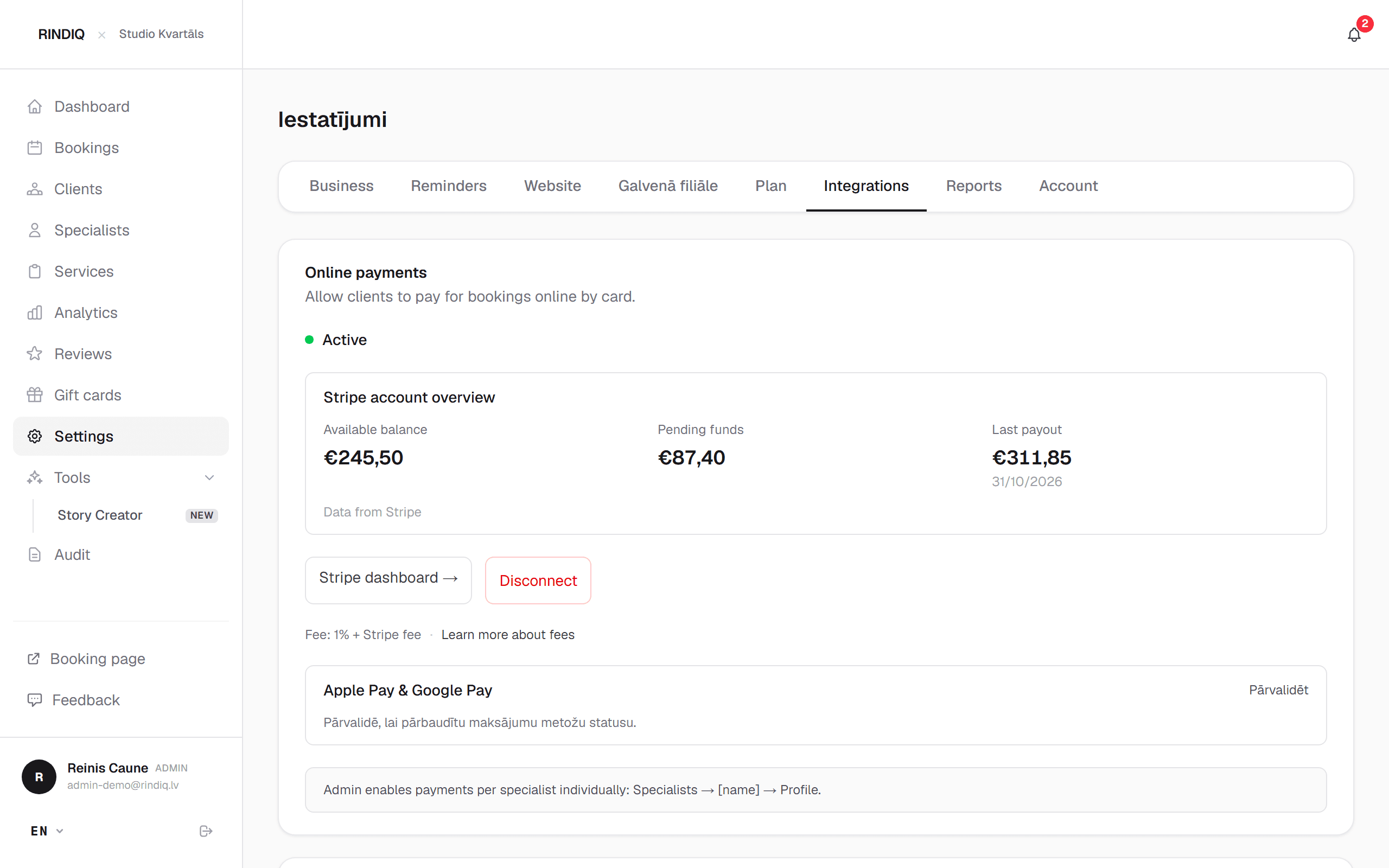
- Open Settings → Integrations → Online payments.
- Press Connect Stripe account. A Stripe page opens.
- Fill in what Stripe asks for: business, bank account, identity. Stripe asks this of every business.
- Come back to RINDIQ. Once Stripe has checked everything, the status shows Active.
2. Switch on the deposit
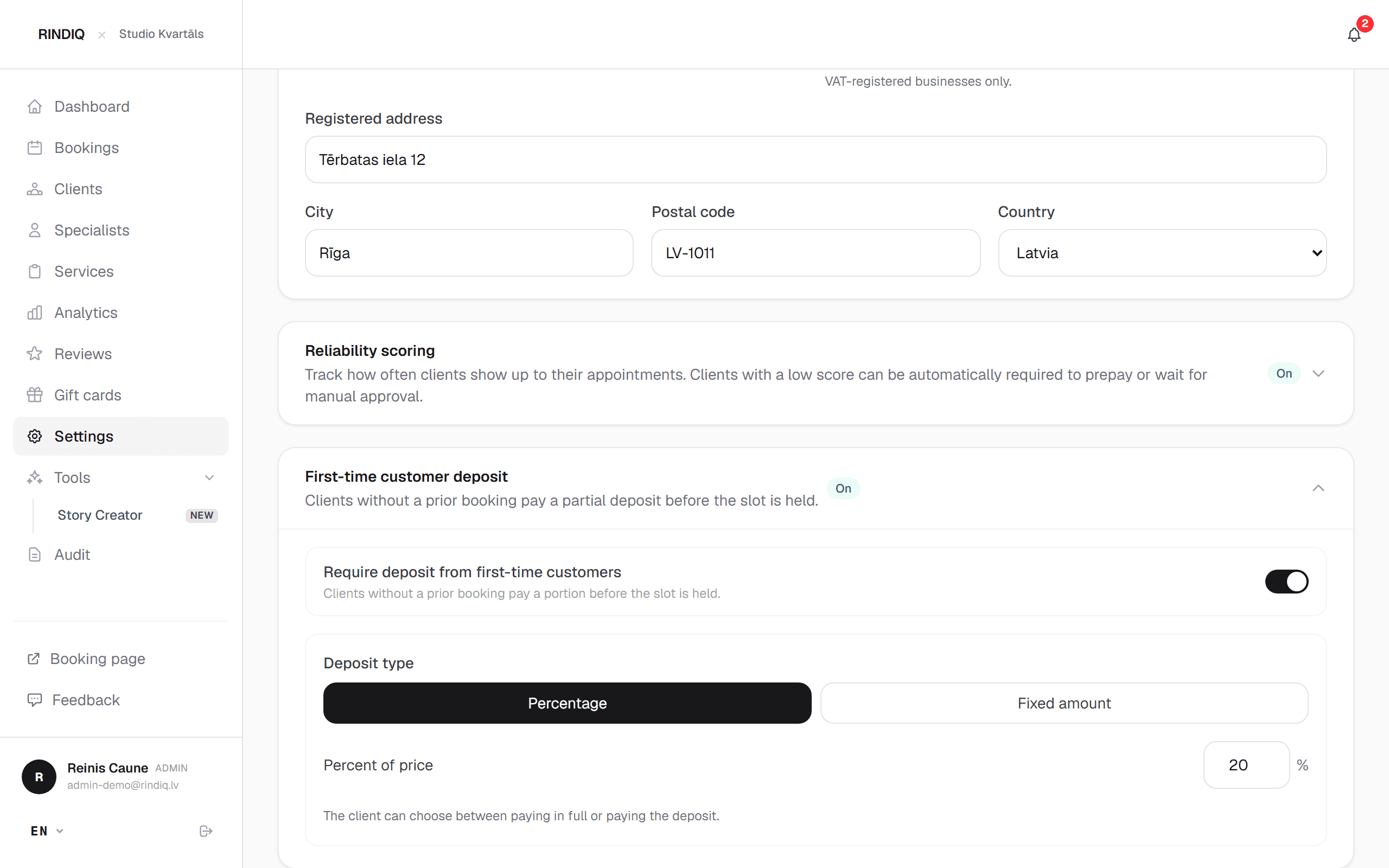
- Open Settings → Business → First-time customer deposit.
- Switch on Require deposit from first-time customers.
- Choose Percent of price or Fixed amount.
- Save.
How much to ask
20 to 30% of the price is usually enough for people to take it seriously without it being an obstacle. For long, expensive treatments you may prefer a fixed amount.
3. Check your specialists
Online payments are also switched on per specialist: Specialists → [name] → Profile. The deposit only works with a specialist who has them on.
4. Try it as a new client
Open your booking page in a private window, book with an email the system doesn't know, and look at the payment step. The client chooses to pay the deposit or the full price, by card, Apple Pay or Google Pay. If a booking isn't paid within 15 minutes, it's cancelled and the slot frees up.
What happens next
- The remainder. The client can pay it from their link or in person with you.
- Cancelling in time. The deposit is refunded automatically.
- Late cancellation or no-show. The deposit stays with you.
- In the calendar. The booking shows how much is paid and how much is left.
How to tell clients about the deposit so nobody gets upset is in How to ask for a deposit without upsetting clients.
Try RINDIQ free for 14 days
No card needed. You can set up your booking page and deposits in about 5 minutes.
Read next
All articlesA client didn't show up. What it costs you and how a deposit prevents it
One no-show on a three-hour appointment can cost around €150 and half a day. How a small deposit changes that.
How to ask for a deposit without upsetting clients
When to bring up a deposit, how to word it and what to reply when a client pushes back.
Reliability score: deposits only for those who don’t show up
A tutorial: a deposit only from clients who have skipped visits before.